📢 Join channels below to get fresher-friendly Tech Opportunities Updates.
Quick Start – Your Project is Ready!
Hey freshers! Need a quick project for your resume?
You’re in the right place. This To-Do List App is designed for Indian students who want results fast. No complex setup, no headaches – just copy the code below and you’re done in 20 minutes.
Perfect for BTech, BCA, and MCA students preparing for campus placements or anyone looking to add a solid project to their GitHub portfolio.
What You’ll Get Here
- Fully functional To-Do List App with add/delete features
- Local storage – tasks save automatically (impresses interviewers!)
- Mobile-responsive design – works on all devices
- Clean, professional look – ready for your portfolio
- Copy-paste ready – no modifications needed
Perfect For:
- Campus placements at top IT companies
- GitHub portfolio building
- Web development interviews
- Quick hackathon projects
- Learning HTML, CSS, JavaScript
Step-by-Step Instructions
Step 1: Create Your File
- Open VS Code or any text editor
- Create a new file called
todo-app.html - Copy the complete code below Paste it into your file
- Save and open in browser
Step 2: The Complete Working Code
Copy this code and paste it into your todo-app.html file:
<script>
    function addTask() {
        let task = document.getElementById('taskInput').value;
        if (task === '') {
            alert('Please enter a task!');
            return;
        }
        let li = document.createElement('li');
        li.innerHTML = `${task} <button class="delete-btn" onclick="deleteTask(this)">Delete</button>`;
        document.getElementById('taskList').appendChild(li);
        saveTasks();
        document.getElementById('taskInput').value = '';
    }

    function deleteTask(btn) {
        btn.parentElement.remove();
        saveTasks();
    }

    function saveTasks() {
        let tasks = [];
        document.querySelectorAll('#taskList li').forEach(li => {
            tasks.push(li.textContent.replace('Delete', '').trim());
        });
        localStorage.setItem('tasks', JSON.stringify(tasks));
    }

    function loadTasks() {
        let tasks = JSON.parse(localStorage.getItem('tasks') || '[]');
        tasks.forEach(task => {
            let li = document.createElement('li');
            li.innerHTML = `${task} <button class="delete-btn" onclick="deleteTask(this)">Delete</button>`;
            document.getElementById('taskList').appendChild(li);
        });
    }

    window.onload = loadTasks;
</script>
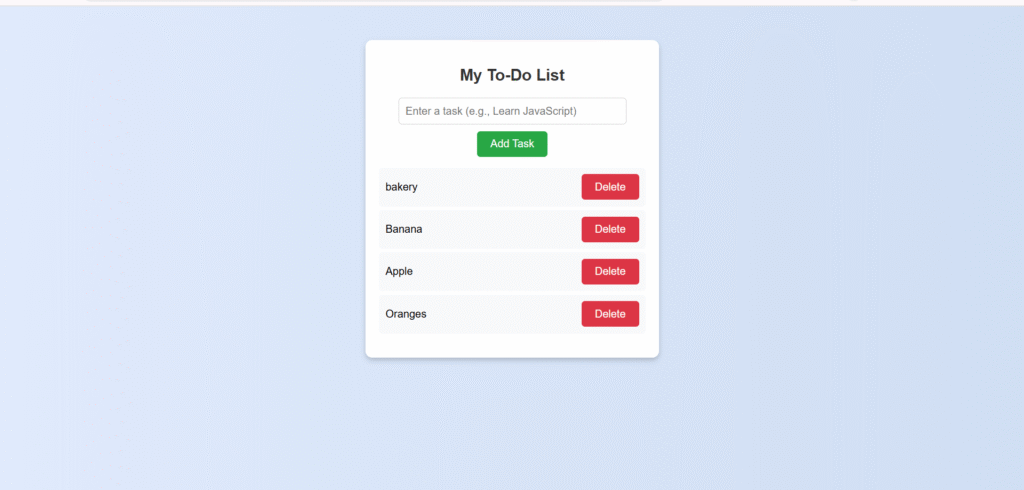
Here’s what your app will look like:
Your finished To-Do List app is clean, professional, and ready for your portfolio!
Step 3: Test Your App
- Save the file as
todo-app.html - Double-click the file to open in your browser
- Add tasks by typing and clicking “Add Task”
- Delete tasks using the Delete button
- Refresh the page – your tasks will still be there!
What This Code Does
HTML Structure:
- Input field for entering tasks
- Button to add tasks
- List area to display all tasks
CSS Styling:
- Beautiful gradient background
- Clean white container with shadow
- Responsive design that works on mobile
- Hover effects on buttons
JavaScript Functionality:
- Add tasks – Creates new list items dynamically
- Delete tasks – Removes items from the list
- Local storage – Saves tasks so they persist after page refresh
- Input validation – Prevents empty tasks
How to Use This for Your For GitHub Portfolio:
- Upload your
todo-app.htmlfile to a new GitHub repository - Enable GitHub Pages in repository settings
- Share the live link on your resume
How to Add This In Your Resume:
- To-Do List Web Application
- Built with HTML, CSS, and JavaScript
- Features: Add/delete tasks, local storage, responsive design
- Technologies: DOM manipulation, localStorage API – Live Demo: [your-github-pages-link]
Why This Project Works for Job Applicants:
- Proves you can build working applications
- Shows knowledge of HTML, CSS, JavaScript
- Demonstrates problem-solving ability
- Portfolio-ready in minutes
Interview Questions You Can Answer
After building this project, you’ll be ready for these common questions:
- Tell me about a project you’ve built?
- Answer: “I built a To-Do List app using HTML, CSS, and JavaScript. It allows users to add and delete tasks, and I implemented local storage so tasks persist even after refreshing the page.”
- How does local storage work?
- Answer: “Local storage lets you save data in the user’s browser. In my app, I save the task list as JSON so users don’t lose their tasks when they close the browser.”
- What is DOM manipulation?
- Answer: “DOM manipulation is changing HTML elements using JavaScript. In my app, I dynamically create list items when users add tasks and remove them when they delete tasks.”
What’s Next After This Project?
- Upload to GitHub immediately
- Add to your resume under Projects section
- Build more projects – Calculator, Weather App, etc.
- Learn React to rebuild this in a modern framework
Free Tools You Need
- VS Code – Free code editor (code.visualstudio.com)
- Chrome/Firefox – Any modern browser
- GitHub – Free hosting (github.com)
Online Alternative:
- CodePen.io – Code directly in browser, no download needed
Common Issues & Solutions
| Problem | Solution |
| “My code doesn’t work” | Make sure you copied the entire code and saved it as .html file |
| “Tasks don’t save” | Local storage works only when you open the file in a browser, not in the code editor |
| “Looks different on mobile” | The code is already responsive! Test by resizing your browser window |
Conclusion
This is not just a tutorial, it’s your first step towards the Indian IT industry.
While other students are still reading theory, you now have a working application that demonstrates real skills.
Great! You’re now a step ahead of thousands of IT freshers in India.
Your journey from student to developer starts with this single file. Copy, paste, and launch your IT career today!